
TransmitterSetup
Related topics: LinuxTestSystem
Project Tasks
- Get logmein credentials (DONE)
- Get information about Hughesnet modem to allow change to Martin's credit card. (DONE)
- Create short demo screen capture video using Logmein and Transmitter (DONE)
- Installed Firefox and new version of flash.
- Established that as the default
- Added startup link.
- This was tested and continued to glitch. Tito switched to Chrome with HTML5 player.
ANTENNA
THE ANTENNA IS NOW INSTALLED. 1. (DONE) Antenna is mostly assembled and missing parts identified, requested and received. 2. (DONE) Swap out the main pole, which I had to upgrade to rigid sch. 40 gal. steel pipe from the fence post I was experimenting with. Only one was 10ft long, but have cut it down to 96". 3. (DONE) Main clamp has been ordered from Steve Moreen and should be here by Thursday, I am told. Add clamp to antenna pole so only one side needs to be clamped to the tower pole. 5. (DONE) Transmission line coax ordered also with sufficient length to guarantee flexibility in location. * (DONE) Need conversion connector N-Type to EIA 7/8" (RECEIVED) 4. Build mock-up of horizontal member of rectangular support of tower to plan location of lateral strut. Need to decide exact length and cut it off and drill the hole so it can be connected to the clamp provided. * (DONE) ACTION Jay: Procure Angle iron for mock up. * (DONE) Need to resolve design of lateral support with Shively * (DONE) Designed lateral support point using chain-link fence hardware. 6. Martin says he has lined up installer who is approved by American Tower. * Need new report from Shively. * ACTION: Need surveyor who can confirm 225 degree. * DONE: Ordered precision compass accurate to within 1/2 degree * DONE: Checked orientation of tower and wrote up report. 7. DONE Need to plan how mostly assembled antenna can be transported to the site. I have a utility trailer that may do the job. Best if we can leave it assembled with 96" pipe and boom at 90 degrees, but it may be possible to "fold" it for transport with minimal assembly on-site. * Installer has a truck and can take care of installation.
Dish & Modem
- http://www.hughes.net -- Ray_Lutz raylutz@hughes.net (dword)
System Information (HT1000)
| Parameter | Value |
|---|---|
| SAN | DSS30664443 |
| ESN | 5240057 |
| System Assigned Identifier (SAI) | 237091 |
| Chassis Part Number | 1503308 |
| Radio Serial Number | 501236611155 |
| Radio Part Number | 1502938 |
| LAN MAC Address | 00:80:AE:3F:59:23 |
| Application Software | 2.2.0.6 |
| Fallback Software | 2.1.1.34 |
| Satellite Beam ID | 3 |
| Satellite Outroute ID | 5 |
| Satellite Gateway ID | 11 |
XMTR & AES
- Have tested automatic roll-over from one preset to another in the xmtr. Internal Playlist automatically restarts with the list is completed so it is not possible to have it retry the audio channel. Set up as follows:
- Preset 1: Internal Playlist
- Preset 2: Audio from Local PC (Move to Preset 1 if no audio for 3 minutes)
- Preset 3: Digital Audio from AES (Move to Preset 4 if no audio for 2 minutes)
- Preset 4: (#6) Shoutcast Stream to Internal Decoder
- (DONE) Moved XMTR and AES to larger rack.
- (DONE) Jay: Need Serial Cable from PC to XMTR for RDS signal. See cable spec below. 9 pin straight thru.
-
(DONE) ACTION Ray: Fabricate cable from relay output of DASDEC to XMTR, so that XMTR is switched to Preset 3 during emergency message. When message is completed, lack of any digital audio will cause preset 2 (local PC) to be reselected. DASDEC Unit will be sited with Transmitter (not in studio). Need two wires, GND + Signal. Can use 4-wire telephone cable to provide two select inputs, even though we only need one right now. AES GP pins are numbered from left.
-
nautel input pins:
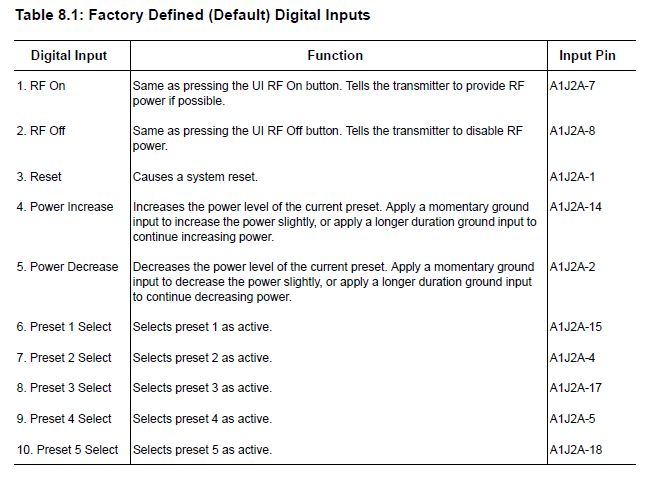
| J2A Pin (Male) |
AES GP Pin | Description | Cable Wire | Function |
|---|---|---|---|---|
| 9,10 | +15V Supply | -- | -- | |
| 21,22 | +15V Supply | -- | -- | |
| 19, 23, 20(lockout) | 1,4,6 | (GND, GPO1-1, GPO2-1) | BLUE | -- |
| 17 | 7 | GPO1-2 -- Preset 3 select | ORG | Momentary low pulse = Select Preset #3. "3. DASDEC Input" |
| 4 | 5 | GPO2-2 -- Preset 2 select | ORG/WHT | Momentary low pulse = Select Preset #6 "4. KNSJ Shoutcast to Nautel" |
Note, the Preset that are selected by these hardware cables is determined by software selection in Nautel
(DONE) Configure DASDEC
GPIO Output #1 can be programmed to make a contact closure: 1. During EAS audio play-out. 2. Momentary closure at start of EAS Audio play-out. 3. Momentary closure at end of EAS Audio play-out. 4. Momentary closure at start and end of EAS Audio play-out. 5. During EAS Video play-out. GPIO Output #2 can be programmed to make a contact closure during: 1. EAS audio play-out. 2. Momentary closure at start of EAS Audio play-out. 3. Momentary closure at end of EAS Audio play-out. 4. Momentary closure at start and end of EAS Audio play-out. 5. EAS Video play-out. 6. Main Serial Port protocol play-out of EAS. 7. While an active decoded alert that has not been forwarded (pending Manual Forward). (Requires Plus Package license) 8. While an unforwarded active decoded alert is unacknowledged. (Requires Plus Package license) 9. Holding of an alert until GPI input 1 is closed. (Requires Plus Package license) 10. Delaying of an alert while GPI input 1 is closed. 11. Play-out of voice dub alert origination. (Requires Plus Package license) SERIAL CABLE XMTR TO PC -- Straight thru cable should be okay.
TOWER PC & NETWORK
- (DONE) Hughesnet dish has been installed and running for nearly a month. Data usage is only about half of 10 GB limit due to unlimited data allowance in non peak periods.
- Need to transfer this account to ASD.
- Move to Tower. Dish location identified on building and installer can install it there, at no charge, I am told, but there may be a small fee.
- Browser-based player in "Tower PC" has been the most robust. Have had it playing around the clock with no problem. Given low data use on Hughesnet, may want to up fidelity setting and go to stereo.
- Would like better player which will log any drop in stream and notify via email if so, and reconnect robustly.
- (DONE) Need to swap out this XP computer for Tower PC and go to another one provided by ASD as I need to keep this PC here bc I have sw installed on it that I can't run on later versions of Windows.
- (DONE): Martin -- need XP Machine or perhaps later machine, see 5 below.
- (DONE) Jay -- Configure PCs for operation in tower.
- (DONE) Have purchased gateway/firewall and configured local network.
- ACTION JAY: Should purchase uninterruptible power supply (UPS) so that PC can remain on even in a power glitch so as to allow us to recover from power outage without going to tower. ISSUE: Need to resolve how PC will automatically POWER ON after power failure. I think UPS unit can do this, but XP may not support it. If so, we may need later OS and PC hardware.
- Test power failure and reboot using Cyberpower unit I have now.
- (DONE) Have tested Logmein access to "Tower PC" from computers that are running on Cox cable internet.
- ACTION RAY: Have started to configure Virtual Private Network tunneling but I'm not sure it is possible with current Hughesnet plan as I haven't been able to find option to order fixed IP address and I don't think tunnels can be established to dynamically assigned IPs. May need someone who is more familiar with Hughesnet to comment on this.
- Hughesnet documentation says that VPNs are not compatible with the protocol they use.
- Set up dynamic url at knsj-tower.dynip.com, Registered as 637763-193605910. Need to renew for May 10.
- See if we can access the tower network directly and without a VPN or Logmein.
- Monitoring and remote control. We may need to improve this but I think we should get a feel for how robust HughesNet is before we add another monthly fee.
- ACTION JAY: (DONE) get PC to boot to Windows and automatically run browser and start media playing.
- ACTION JAY: finish any testing of electronics package here, transport to the tower, and install.
- ACTION JAY: Need a minimal playlist in the transmitter with announcements that it is only a test.
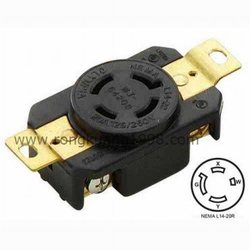
- ACTION JAY: Need to plan for power. Wall plug is NEMA L14-20R 20A 125/250V Locking Receptacle http://i00.i.aliimg.com/wsphoto/v0/687388046/WJ-6420B-NEMA-L14-20R-20A-125-250V-Locking-Receptacle-NEMA-Twist-Lock-Receptacle-with-UL.jpg_250x250.jpg
| DEVICE | IP | MAC | USER | PSWD HINT | Service | Port |
|---|---|---|---|---|---|---|
| Gateway Router | 192.168.1.1 | admin | 9s | Router | 5991 | |
| Nebula PC (XP) | 192.168.1.2 | 00:07:e9:6c:5a:7f | User | 9s | -- | -- |
| Nautel Xmtr | 192.168.1.3 | 00:50:c2:59:7b:5d | Nautel | 9s | Nautel | 5993 |
| DasdecII | 192.168.1.4 | 00:30:18:a5:98:f9 | Admin | 9s | Dasdec | 5994 |
| Einstein PC (XP) | 192.168.1.5 | 00:16:76:85:7c:4a | PCUser | AC6 | -- | -- |
| DISH | 192.168.0.1 | 00:80:AE:3F:59:23 | SatDish | 5990 |
| Category | Config Parameter | Setting |
|---|---|---|
| outgoing server | smtp.hughes.net | |
| outgoing port | 25 | |
| client name | raylutz@airprogressive.org | |
| sender name | raylutz@hughes.net | |
| Authentication Required | Yes | |
| User Name | raylutz@hughes.net | |
| Password (hint) | dword | |
| dynip | Domain | knsj-tower.DynIP.com |
| dynip | Reg. Key | 637763-193605910 |
SHOWPUMP and Content
- (DONE) Complete new version of "Showpump" which provides exact time when each track played in a format so website can be dynamically updated without needing to refresh page.
- (DONE) One-on-one tutorial with Bill Driscoll and follow up tutorial with radio project participants about RSS feeds and RSS Builder program, which is one option to produce the RSS feed for each show.
- Tito is setting up FTP Site on KNSJ.org server.
- Discussed with Tito idea of unifying KNSJ on same server as SHOWPUMP.
- Need to configure icecast server with mount point for KNSJ, likely providing higher fidelity stereo for the tower rather than lower-fidelity mono which is sent to random devices like smartphones.
- Need KNSJ station announcements & jingles. I can create initial announcements that can be replaced as desired.
- Need to configure icecast to accept LIVE feed when it is available, and roll over to dynamic SHOWPUMP feed when not, and then roll over to last-resort mp3 when dynamic SHOWPUMP feed is not available. I have tested this before but need to retest now that I have an icecast server running in a test-bed linux machine.
- --> ACTION ASD: Need to review content lineup that is on AirProgressive and provide exact changes needed for KNSJ use.
- Upgrade SHOWPUMP so it is configurable using browser instead of using configuration file.
- ASD needs to resolve policy regarding content proposals and approval process.
Studio(s)
- Execute MOU between ASD and COPS/Lutz regarding use of east-county studio and SHOWPUMP dynamic show scheduler.
- (DONE) Have microphones, USB mixer, headphones, etc. for production of shows at Studio East. Studio East is also outfitted with backdrop for video production and echo suppression paneling. Can accommodate group of probably four guests at a time.
- Need to test uplink of live shows, likely with BUTT utility (Broadcasters Use This Tool) to provide low-fidelity stream for icecast server and simultaneously store higher fidelity version for podcasts/delayed broadcast. (Have previously tested BUTT but need to test with new configuration.)
- Can use Skype for interviews and chat for feedback from listeners. Should review telephone hybrids but times have changed and I don't think a traditional hybrid is probably the way to go.
- Studio East will need holding tank if we plan to use toilet or perhaps porta potty. Can't provide restroom facilities in our home, sorry.
- Studio East is not ADA compliant. May need to build a ramp.
- Need to change out lock on door to code-type I think.
-
ACTION JAY: Compile initial station file.
- Holding tank suitable to activate toilet in white building.
- 300 Gallon above ground holding tank. $429 + $225 shipping = $664
- http://www.ntotank.com/300gaabgrhot1.html
- Lead time to get the tank is 1 week.
Notes
- DASDECII -
- Connect DASDECII EAS output to input EAS input of transmitter.
- Create a cable that connects from GPO1 and GPO2 to select the input to the transmitter.
- GPO1 selects DASDEC signal during emergency message.
- GPO2 selects PC Audio in.
- Set rollover from PC Audio in absence to internal playlist after x minutes of dead time, and send an alert of rollover.
- Jay said: LP1 is KOGO-AM: 600 kHz and LP2: is KOGO-FM: 95.7 Mhz and any auxiliary: KLSD 1360kHz.
- Steve said use NOAA instead of KLSD.
- Hybrid --
- Delay line to allow
- LDF4-50A coax is used to connect xmtr to antenna.
* Screen capture showing access to Nautel transmitter but "will not connect" message.:
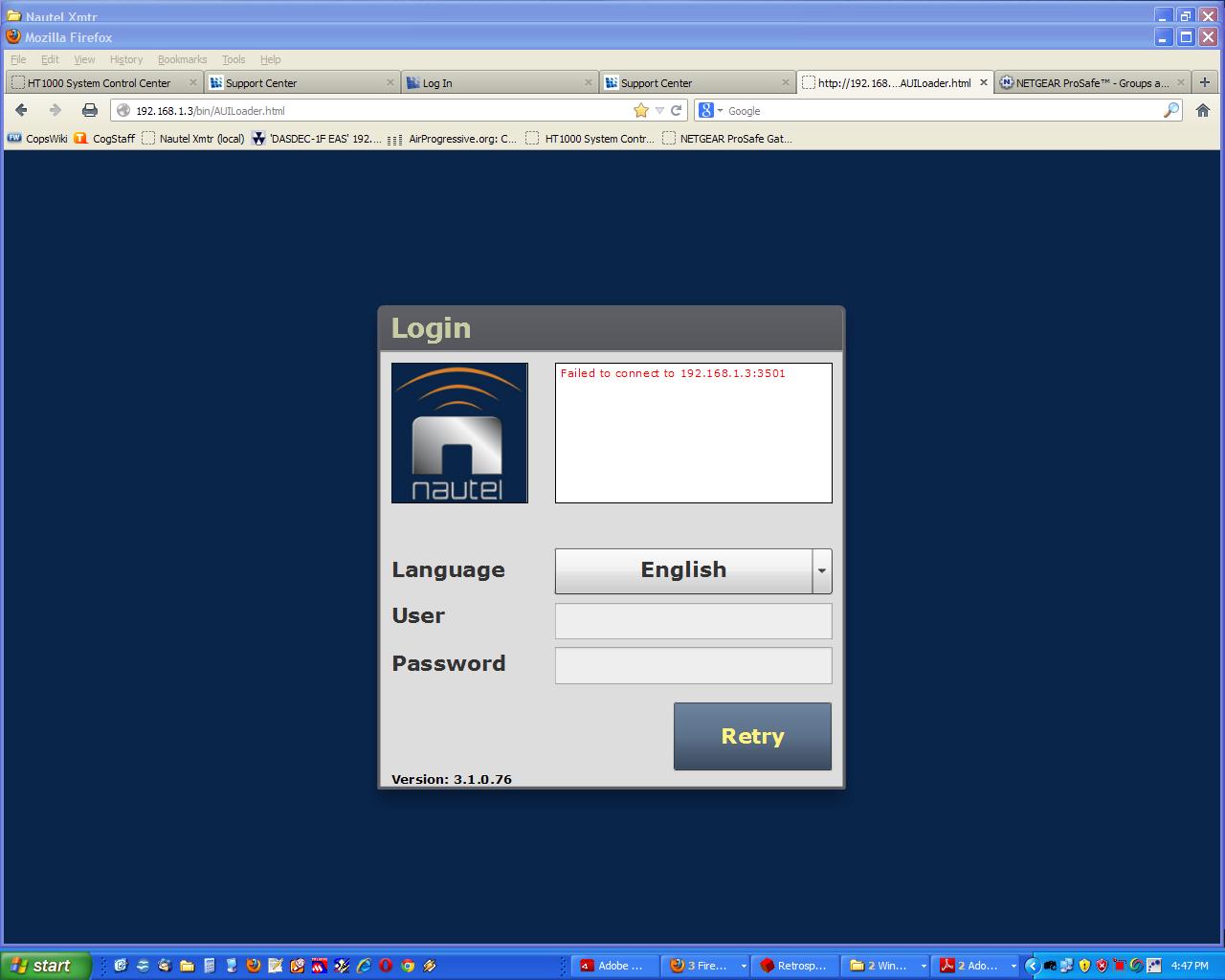 * Confirmed that xmtr is set to RMT (remote) mode. * Tried cycling power (unplugging) xmtr. * Tried clearing browser cache. * Shut down computer and rebooted... this fixed this problem!
BUTT settings
- Main
- Audio Device: Default PCM device
- Server:
- Type: Icecast
- Name: AirProgressive Live
- Address: airprogressive.org note: do not prepend http://
- Port: 8000
- Password: s-b hint
- Mountpoint: /live-stream note: must prepend '/' to match designation in icecast config.
- Stream
- Bitrate: 32K
- Samplerate: 22050
- Channel: Mono (this is probably better to be stereo)
- Codec: mp3
- (rest blank)
- Rec
- Filename: rec_(%m_%d_%y)_%i.mp3
- Save to: ./
- X Start record when connected.
- Bitrate: 64K
- Samplerate: 44100
- Channel: Stereo
- Codec: mp3
Then listen at:
Nautel Settings
| Preset | Menu | Parameter | Value | Comment |
|---|---|---|---|---|
| 1: Internal Playlist | General | Output Power | 157 W | Antenna has a gain of 2.1 to produce 330W effective Power. |
| \^ | \^ | Frequency | 89.1 Mhz | |
| \^ | \^ | Mode | FM | |
| \^ | Main Audio | Audio Source | Secondary Digital | |
| \^ | \^ | Secondary Source | Playlist | |
| \^ | \^ | Digital Level | 0.0 dBFS | (db Full Scale) 0 = full scale, -6 = 50% of full. |
| \^ | \^ | Audio Mode | Stereo | Changed 2013-07-09 from Mono L+R, mp3 should be encoded as JOINT STEREO |
| \^ | \^ | 15 kHz Lowpass | On | Eliminates very high frequencies |
| \^ | \^ | Preemphasis | 0us | ? |
| \^ | \^ | Audio Mod Adj | 0 dB | ? (enter value between -20 and +10 dB) |
| \^ | SCA | (ALL) | Disabled | |
| \^ | RDS | RDS | Enabled | |
| \^ | Other Audio | Pilot Level | 9.0% | enter value between 6 and 12% |
| \^ | \^ | Pilot 1PPS Sync | OFF | If ON, Pilot Sync Phase (enter value between 0 and 360 degrees) |
| \^ | \^ | Audio Delay | No | |
| \^ | \^ | Audio Loss Timeout | No | |
| \^ | \^ | Hard Limiter | On; Limit = 160% | |
| \^ | \^ | AGC Limiter | On; Limit = 120%; TC=120ms | |
| \^ | \^ | Two-Slope Limiter | Disabled | |
| \^ | \^ | Orban Processor | Disabled; Type=Rock-Smooth | |
| \^ | \^ | L+R Limiter | Disabled | |
| \^ | \^ | MPX Power Limiter | Disabled |
SCA -- When FM is broadcast, there is more bandwidth available than is necessary. Stereo usually uses the frequencies between 19 to 53 kHz, leaving the frequencies from 53 to 100 kHz for programming. SCA--a legal term that stands for "Subsidiary Communications Authorization"--uses this extra space for special programming between the frequencies of 67 and 92 kHz. This special programming can consist of anything, but it usually takes the form of readings for the blind, multicultural radio, or other things like that.
To take advantage of these broadcasts, you need a special radio receiver. Radio SCA/SCMO offers you SCA/SCMO/AM/FM subcarrier radio decoders. Our radios offer the highest quality in both sound and reception, and are offered at surprisingly low prices.
Debugging Failure of 2013-08-02
DID Emergency broadcast occur?
It appears that it did at least try to do so. Here is the log:
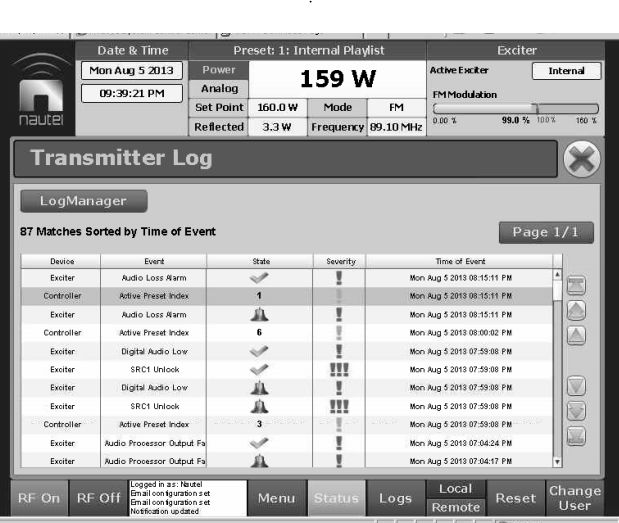
- at 7:59.08 pm the active preset was changed to 3, which is the DASDEC.
- Not sure why it reported digital audio low right away.
- It changed back to Shoutcast to Nautel (#6) at 8:00.02
- --> This was NOT because of an audio loss timeout, which would have switched it to #2.
- Fifteen minutes later, it detected audio loss., and went to internal audio.
- There is a hardware cable from the DASDEC to the Nautel which is correctly selecting the DASDEC input.
-
However, it is not getting the digital signal from the DASDEC, and then it is failing over to preset 6.
-
The digital audio cable from the DASDEC to the Nautel might be unplugged.
- The timeout may be too short. I will check that.
- Time out set to 15 seconds. Changing this to two minutes.
- --> Hardware cable should reselect #6 (4. KNSJ Shoutcast to Nautel) after the end of the DASDEC transmission.
- So this is an ultimate fail safe if there is something wrong with the cable.
- --> Audio loss preset was set to Audio from PC (#2) Changed this to Shoutcast (Preset 4. (#6))
- This was set incorrectly, but was nice to have it that way bc it showed us that an audio loss timeout did not occur.
- --> Apparently, transition for return should have been on falling edge but it said rising edge.
- Even though this should not matter because the pulses are at the start and end of the period.
- Set Shoutcast preset (4. KNSJ Shoutcast to Nautel) at 8:53pm
- Checked RDS settings, these seem right for preset 4 (#6).
- Turned Audio Mod Adjustment back down to +0.0 dB
Remote access using NAT
- Arranged for account with DynDNS instead of DynIP - This service provider is listed in router settings.
- See Network Configuration - Dynamic DNS - Dynamic DNS
- Get current IP address: Monitoring - Router Status
- Set up services, (security-services) which is where you assign the ports.
- Then (security-Firewall-LAN WAN Rules - Inbound Services) to link service to local IP address
- Tried to access ports with PortForward.com PFPortChecker -- could not access.
- Downloading and installing OpenVPN
- Hughesnet says:
- VPNs are not recommended - VPN usage for residential customers is generally not recommended as it will significantly reduce your speed and system performance; therefore, you may not be able to perform the activities you would like to do online. However, your normal speeds will return once you disconnect from a VPN if you choose to use it with HughesNet. Note: HughesNet Technical Support does not provide help with configuring or troubleshooting problems associated with VPN clients.
- Static IPs are not available with residential service. If a static IP is needed, we recommend that you contact the Hughes business services group at 1-866-674-4406. If you plan to use HughesNet for remote home devices that allow you to control your lights or thermostat from a phone or for a security device that allows you to watch video remotely, we recommend that you check your device's user manual to see if a static IP is required.
- Can I ping my IP address? - If you have the Business Edition with a Static IP address, you may gain access to your computer via your IP address and may run a server on your computer accessed with your IP address. This allows you to use your IP address to ping your computer, host a website, run a FTP, or other servers on your computer.
- A Static IP address will allow you to connect to a server on your hosted computer with ease. A routable Static IP address is available with our Business Edition. This will allow you to use many of the services mentioned above. The Business Edition is designed for home office workers, small business owners and heavy Internet users who want fast Internet access. This premium service is a step up from the standard Consumer version of HughesNet, offering increased download capacity, larger data volume and support for multiple users. For more information on how to obtain a Static IP address, go to http://www.hughesnetbiz.com where you will find instructions on how to upgrade to the Business Edition with a Static IP address.
- Called business office of Hughesnet.
I. did some research for about the past 5 hours to try to get direct access to the tower, using DYNDNS or another similar service that provides dynamic access to the tower from the outside. The end result of this research is that THIS IS NOT POSSIBLE with this sort of residential system from Hughesnet. I. have attached the brochure from Hughesnet regarding their COMMERCIAL satellite system. This system runs to a DIFFERENT SATELLITE and requires completely different equipment, including a larger (nearly 1 meter) dish. We need DAILY download allowance of 345 MB, just for the stream. With any other interaction (operator logins), we likely need to go to the Express 200 level, meaning 109.99 a month. Plus $15 a month for static IP, plus $29.99 a month to rent the equipment, total of $155 a month. There is no monthly download limit. The current residential plan we are on is limited to 20GB during prime time and 20GB during 2am to 8am (6 hours). running at 32kbps, we need 345 MB/day. For 30-day month, that is 10.350 GB. But 1/4 of that is in the 2am to 8am time period, so we need only 7.76 GB per month JUST FOR THE STREAM. If we do other things, like fiddle with the server, we have 3GB extra for that. So I anticipated that we could get by with the 10GB plan. Unfortunately, the stream was run at higher rates last month and we had to upgrade the plan to 20GB, and that is where we are today (plus we lease the equipment for $10 a month). To move to this commercial system, we would need to get out of our contract with the residential system (which has a 24-month contract or we pay early termination fees).You will be charged a Service Termination Fee of up to $400. The exact amount of the Service Termination Fee will be $400 for the first ninety (90) days after activation of the HughesNet Service. Thereafter, the amount of the Service Termination Fee will decrease by $15 per month for each month of active Service.For the foreseeable future, we are using logmein to access any of the devices in the tower. We can terminate any use of DYNIP or DYNDNS for these purposes because they will not work.
Audio loss alarm on 2013-08-11
Tito says:
Matthew got the Barix box working and switched the Nautel to Preset 4, Shoutcast-to-Nautel. I think that was early Sunday morning.
He called me on Sunday afternoon to ask me to check the Nautel because he couldn't remember if he stopped the iTunes player. This would not affect the Shoutcast-to-Nautel broadcast but would waste precious bandwidth. I checked and found everything running the way Matt left it. I stopped iTunes and minimized the player.
I. had some trouble with logmein that day but that may have been my local internet connection since the rainy season has been wreaking havoc and they're working on the fiber optic in my region. I'm not sure what triggered the audio loss alarm, that may have been the Barix box failing at some point before Matt got it working.
I. think it's been stable since.